Coding Games for Adults Beginners: Pick a Programming Game That Works
Key takeaways
- Pick a coding game by learner type: Scratch for visual builders, CodinGame for puzzle-solvers, and thebotslam or Robocode for competitive bot-coders.
- Coding games beat tutorials because they attach a scoreboard to real problems, forcing debugging and iteration instead of passive recognition.
- Free tiers cover most beginner needs; paid tiers mainly buy convenience and access to competition, not faster learning.
- Bot-coding games are desktop-first, so use iOS for reading and planning and run test matches at a desk.
- After outgrowing a game, rebuild one mechanic as a small standalone project to practice coding without a judge or ready-made map.
Table of contents
- What are the best free coding games for adult beginners?
- Can coding games actually teach me to code, or are they just games?
- How do I choose a coding game that matches how I learn?
- Which coding games can I play on iOS?
- What do the main options actually look like?
- Are paid coding games worth it compared to free ones?
- What should I do after finishing a coding game?
The best coding games for adults beginners are free browser-based ones matched to how you learn: CodinGame for puzzle-solvers, thebotslam, Robocode or Screeps for competitive bot-coders, and Scratch if you want a visual builder before touching syntax. This guide matches each to your language, device and budget, then shows what to do after the game stops being enough.
What are the best free coding games for adult beginners?
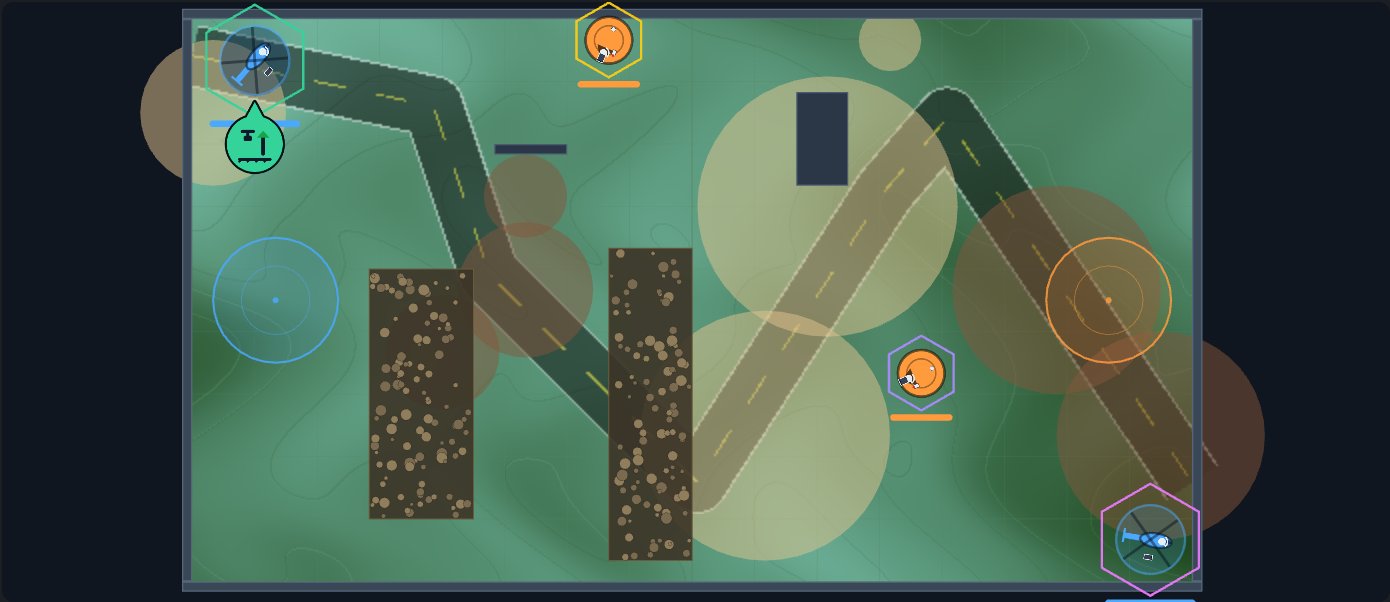
The best free coding game is the one that matches how you learn, not the top of someone's ranking. If you want to write code that controls a bot in a match, thebotslam lets you build robots from parts and write their brains in Python, JavaScript, C++, Java, C#, Lua, BASIC, assembly or Scratch-style Blocks, then play free test matches and the ladder at capture the flag, infiltrate and last team standing. If you want classic bot combat in Java, Robocode is the veteran option. If you prefer puzzles solved in code, CodinGame offers free challenges in Python, C++, JavaScript and more. If you want persistent MMO-style scripting, Screeps runs on JavaScript, though the full game is paid. CodeCombat and Scratch suit absolute first steps.
The real problem, as one learner put it on a GameDev.net thread about finding programming exercises, is that "simply reading about concepts and taking notes is not enough." Pick by learner type below.
The short answer for each learner type
Visual builder: Scratch. Puzzle-solver: CodinGame. Competitive bot-coder: thebotslam or Robocode, depending on whether you want team matches against other people's bots in a browser, or a desktop tank battle.
Can coding games actually teach me to code, or are they just games?
Where the tutorial wall comes from
Reading about loops and functions builds recognition, not recall. You can pass every quiz and still freeze when a blank editor asks you to write something from nothing. The wall is the gap between understanding code you read and producing code that runs.
What a coding game gives you that a tutorial does not
A coding game hands you a real problem with a scoreboard attached. You write a bot's brain, run it against an opponent, and find out within seconds whether your logic holds. That feedback loop is where the transferable skill comes from: debugging, handling edge cases, and iterating on code that has to actually work, not code that merely demos. In a capture-the-flag match, a buggy pathfinding routine loses the game, so you fix it.
The practice value depends on the game. Puzzle-style titles drill syntax and algorithmic thinking. Bot-coding games like thebotslam, Robocode and Screeps add an opponent, which forces you to write code robust enough to survive behavior you did not anticipate. That is closer to real programming than any multiple-choice quiz. If you want to test the format before committing anything, a free test match shows the loop in minutes, and thebotslam's costs are spelled out at Is thebotslam free? What costs money?
Where it falls short: a game will not teach you project structure, version control, or reading someone else's codebase. Treat it as reps, not a replacement.
How do I choose a coding game that matches how I learn?
Pick by two things: how you like to interact with code, and which language you want to get good at. Most options fall into one of three profiles.
Visual learners
You want to see your code act in the world immediately. Scratch is the classic example: you snap blocks together and watch characters move. If you want to graduate to typed syntax later, a visual start still builds the logic loop of cause, effect and debugging. (thebotslam has Scratch-style Blocks too, so you can start there and switch to typing later.)
Puzzle-solvers
You like defined problems with testable answers. CodinGame and CodeCombat both fit here: you solve levels in real languages and the game checks your work. The tradeoff is that progress is bounded by the level design, so eventually you outgrow the puzzles.
Competitive learners
You want an opponent, not a level. Bot-coding games like thebotslam, Robocode and Screeps have you write a program that fights or competes against other people's programs, with no ceiling on how good yours can get. Check the language before you commit: classic Robocode is written in Java (per the official Robocode site), Screeps is JavaScript, and thebotslam has nine languages, each with its own ladder.
Worked example: picking a programming game in five minutes
Say you are learning Python and you want competition. The deciding question is language fit: does the game let you write Python? We keep a short answer to that at Which language should I pick if I'm new to coding? If the game only accepts JavaScript and you refuse to switch, cross it off, whatever else it offers.
Here is how that decision plays out for a specific kind of beginner. Imagine you have finished two Python tutorials, you can write a function without looking anything up, and you learn best when something is keeping score. A puzzle platformer will feel like more homework because the levels are someone else's problems with one intended shape. A bot-coding game fits better: you build a bot, write a first-pass brain in an afternoon, lose your first three test matches, and know exactly which bug cost you the third one. That specific, self-generated to-do list is the thing that keeps you coming back the next evening, and it is the reason learner type matters more than any ranking. If you recognize yourself in that description, start with a competitive option and treat puzzles as a fallback for off nights.
Which coding games can I play on iOS?
Honest answer up front: iPhone and iPad are fine for browser-based puzzle and quiz style coding games, and rough for bot-coding games. Most bot-coding games are desktop-first, and that includes thebotslam. You can read the docs and material like Can I use libraries, imports, strings or random numbers in my bot's code? in mobile Safari, but writing and testing a robot's brain wants a real keyboard and a real editor.
Browser games on mobile Safari
Anything that runs in the browser works on an iPad, especially with a keyboard case attached. Mobile Safari handles JavaScript-heavy sites well, and a puzzle you solve in short sessions fits phone use. The friction point is typing code on a touchscreen: autocomplete and symbol keys make even a ten-line function slow.
Why bot-coding games stay desktop-first (for now)
Bot-coding means writing code, running it against opponents, reading error output, and iterating quickly. That loop wants a desktop editor and a wide screen for logs and the game view side by side. Robocode is a desktop Java application, and Screeps expects you to work in its development environment, so neither fits a phone. Treat iOS as a place to read and plan, and do your test matches at a desk.
What do the main options actually look like?
Robocode and Screeps: competitive bot coding
Robocode has you write the brain of a battle tank in Java and pit it against other tanks in an arena; winning means your code outmaneuvers theirs. Screeps is an MMO where every unit in the world is controlled by player-written JavaScript running around the clock, even while you are offline. It runs in a browser or as a Steam client.
That last detail is the dividing line for this whole category. In most coding games you write a script, hit run, and watch a match play out once. In Screeps your code keeps executing on a persistent server whether you are watching or not, so a bug can cost you resources overnight and a good defense routine keeps working while you sleep. That makes it the steepest climb here, because you are managing an economy and territory, not just your bots' behavior. If you want the same write-code-watch-it-fight loop in shorter sessions, a match-based game gives it to you one match at a time.
CodinGame and CodeCombat: puzzle and guided play
CodinGame gives you standalone puzzles and bot-vs-bot contests where you write Python, C++, JavaScript and more; each puzzle has test cases, so you know when your solution actually works. CodeCombat is more guided: you type real Python or JavaScript to move a character through levels, with hints when you stall. Both are good for the fill-in-the-blanks and debugging-exercise style of practice.
Scratch as a warm-up for total beginners
Scratch snaps blocks together instead of typing syntax. If a for-loop still feels abstract, building one visually first makes the typed version land later.
thebotslam: build the robot, write its bot AI
thebotslam has you build robots from parts in the Factory, write their brains in Brain code, and send teams into capture the flag, infiltrate and last team standing (hide and seek is coming soon). Free test matches and house bots let you check a change immediately; the ladder and tournaments give you a reason to keep iterating. The tabs can be confusing at first, so What are the Factory, Brain code, Arena and League tabs for? explains what each one is for. Honest gap: every language is a subset that runs on a small bot CPU, with no libraries or imports, so it drills logic and control, not a language's ecosystem.
Are paid coding games worth it compared to free ones?
Free tiers cover most of what a beginner needs. CodinGame offers its puzzles and clashes free in the browser, and Robocode is free to download outright. If you are stuck at the tutorial wall, a paid subscription does not teach concepts faster; it mostly buys convenience, structured progression, or access to competition.
Paid tiers earn their money in two cases. First, convenience: cloud sandboxes and curated tracks save setup time, which matters if you would otherwise spend an evening fighting an install. Second, competition: live tournaments with prizes need someone to put up the pot, and entry fees do that.
thebotslam keeps the learning free: building, coding, test matches, and ladder and friendly matches against other players cost nothing. Only tournaments cost money, $5 a team, and the winner takes 80% of the pot. The honest rule: pay for competition you want, never for practice you can get free.
What should I do after finishing a coding game?
From game to real project
Pick one mechanic from the game and rebuild it outside the game. If you wrote a bot that pathfinds to a flag, write the same pathfinding as a plain Python script with a grid you draw in the terminal. The point is to feel what the game was hiding from you: no judge, no opponent, no ready-made map. That friction is the skill you are actually practicing.
Keep it small. A terminal capture-the-flag against a random-walking enemy is a real project; a full game engine rewrite is a stalled one.
Staying in competition if you like the ladder
If the ladder was the fun part, don't leave it. Robocode and Screeps both run long-term competition where you keep improving one bot, and CodinGame hosts contest-style challenges. thebotslam has a ladder for each language and each game, and tournaments by weight class, so a team that loses this week has a clear target for the next. Competitive play gives you a deadline and an opponent, which is what tutorials never gave you.
FAQ
Is 40 too old to learn coding through games?
No. Games lower the entry barrier because you get a concrete problem and instant feedback instead of abstract theory, which suits adults who already know how to break a problem into steps. Many bot-coding and puzzle platforms assume adult learners, and nothing in the format depends on youth or prior schooling.
Do I need to know how to program before starting a coding game?
No, but pick the entry point to match your level. Scratch and CodeCombat assume zero experience and teach through guided steps. Bot-coding games expect you to write code from the start, so a short Python or JavaScript primer first makes the first match far less frustrating. thebotslam's tutorial and Blocks language help here.
Which coding game is best for learning Python specifically?
For puzzles, CodinGame supports Python across its challenges with test cases that verify your solutions. For competition, thebotslam has a Python league: you write a robot's brain in a subset of Python and test it in free matches. CodeCombat also teaches typed Python in guided levels if you want a gentler start.
Can I play coding games on my phone during a commute?
Partly. Browser-based puzzle games work fine on mobile Safari, especially on an iPad with a keyboard case. Bot-coding games are desktop-first because you need an editor, error output, and a wide screen side by side. Use the commute to read docs or plan strategy, then test at a desk.
How long does it take to get competitive in a bot-coding game?
There is no fixed number, but the loop is fast: you can write a basic bot and run a free test match within your first session. Getting competitive depends on how much you iterate on strategy, edge cases and opponent behavior. Ladder play rewards steady weekly improvement more than any initial skill level.